

.jpg)
Originally posted on Deltek.com. Link here: Set Up Your Billing Process for Success with Deltek Vantagepoint
By Deltek
Many architectural, engineering (A&E) and consulting firms are looking for ways to increase cash flow. Getting invoices to clients as quickly as possible is essential when trying to improve your incoming cash flow. This two-part blog post series will cover tips and tricks for improving your billing process so that you can get paid faster.
Knowing your business, your clients and the tools available in Deltek Vantagepoint can go a long way in improving the efficiency and effectiveness of creating a streamlined billing process. To get started, here are a few things to think about when fine-tuning a billing process to accelerate payments:
- Know your clients – Are there clues in the contracts or past experiences with specific clients that identify certain needs such as using a third-party portal for invoicing, requirements for supporting documents, invoice timing, etc.? Understanding your client’s needs upfront can minimize delayed invoices.
- Know your projects – Is this a fee or transaction-based project? How does it need to be structured? Are there milestones? Knowing your projects and understanding the billing requirements up front ensures your projects are structured in a way that can be invoiced as needed, ensuring the correct rates are used or that specific tasks are tracked accordingly.
- Know your process – What are the business processes in your company that impact or are impacted by billing? Understanding your month-end process and impacts of billing on financials and revenue or vice versa can be very useful when making sure things are done in a timely manner to prevent delays in invoicing.
- Know your system – Understanding the system you are working with, along with its capabilities and options, is essential to improving or streamlining any process. Being able to couple an understanding of the system and its available options when trying to fulfill your billing objectives provides the upper hand to get things done right the first time.
From preparing the invoices to getting them out the door, Deltek Vantagepoint provides many tools to help create the most efficient and effective process for billing your clients. Accurate setup is the start to streamlining a billing process, which includes establishing the project and project structure, adding billing terms and creating rate schedules and invoice templates.
Setting Up Projects for Successful Billing
First, let’s talk about project setup. There are a few things to consider after reading the contract and understanding any terms or requirements that impact billing.
- What is the right project structure or work breakdown structure? Work breakdown structure (WBS) is one of the first decisions to make when setting up a project. Do you need to break the project down into phases for tracking on invoices? Maybe you need the structure for managing tasks. What structure is needed and why do you need it?
- How should costs be captured and tracked? The project structure can impact how costs are captured and tracked and even how they relate to budgets. Do you have a budget broken down by sections on the contract that need to be tracked? If so, add phases or tasks accordingly.
- Does the project require comments to support all labor? If so, consider setting up the project so that when staff charges time to the project, timesheet comments are required. You may need these for project manager (PM) review but can always show or hide on your invoice based on how you set up your billing terms.
- Is back‐up information needed? If so, identify what type of back up is needed for invoice support. There are options in Vantagepoint to identify those requirements in billing terms.
At the end of the day, the project setup is one of the most important aspects of the invoice process. Preparation up front will reduce the corrections and changes once it is time to invoice the client.
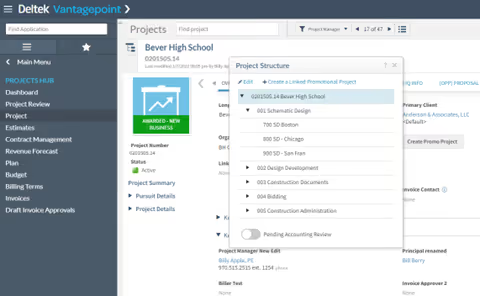
Set up project structure within the Deltek Vantagepoint project application
Billing Terms: The Brain to Your Billing Process
A significant piece of project setup is the structure of your billing terms, which serves as the brain behind billing your projects. It is vital to understand client requirements when setting up your billing terms as this is what sets most of the logic that Vantagepoint uses when preparing your client invoices.
It is important to understand the logic of how information entered into the billing terms is used in calculating invoice amounts and billing extensions. When there is a charge to a project, Vantagepoint looks at billing terms for that same WBS level to calculate the billing values. If there are no billing terms set up, Vantagepoint will move up to the next level and use those terms. It is only necessary to set up billing terms at the lower levels (sub-level terms) if the invoicing or rates are going to be different at the lower levels.
IDENTIFY MISSING BILLING TERMS
Projects that are missing billing terms can be detrimental for your billing process. Identifying missing billing terms can be done in several ways in Vantagepoint: a project search, a dashpart created to highlight missing billing terms or a missing billing terms report.
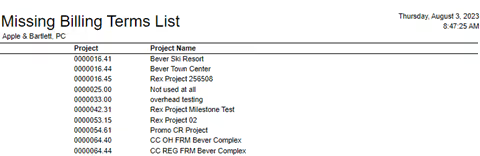
Quickly identify missing billing terms through a project search, a custom dashpart or a report
COPY BILLING TERMS OR CREATE TEMPLATES
The option to copy billing terms from a project or template can also be a time saver, especially if you have projects set up similarly or clients that often have the same requirements. It may be worth the time to set up specific templates that incorporate your most common settings.
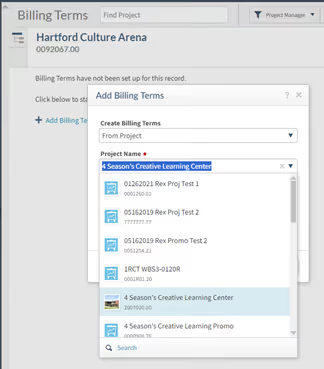
Quickly copy billing terms from other projects within the Deltek Vantagepoint billing terms application
BILLING TERM OPTIONS FOR CLIENTS
Here’s a quick cheat sheet for the main options or purpose of each tab for billing terms within Vantagepoint. Being familiar with this information will allow you to quickly go to the section you need to enter or update when completing your billing term setup.
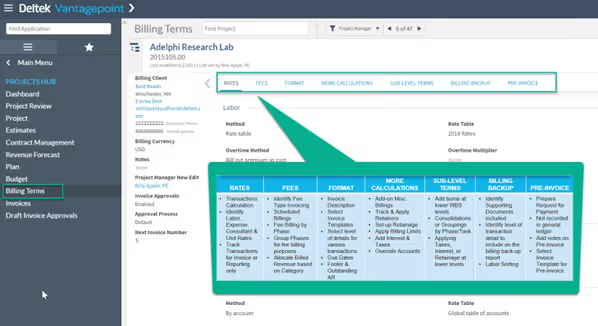
Easily enter and update billing terms in the billing terms application
Identify Proper Fee-Based Billing
When adding fees in billing terms, there are several options as outlined below. Being familiar with the contract and the fee options available in Vantagepoint will help set up billing terms correctly to expedite that first bill to your client.
- Fee methods available include percent complete, fixed amounts, unit-based fees and percentage of construction.
- Allocate fee based on category is an option that allows a summary invoice for the total fee to be billed on the invoice, but also allows the revenue to be tracked internally by labor, expenses or consultants.
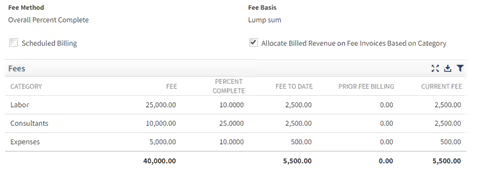
Allocate fee based on category
- Scheduled billings provide an option for a schedule to be created at certain milestones ahead of time with specific amounts or a percentage of fee to be billed on a scheduled date.
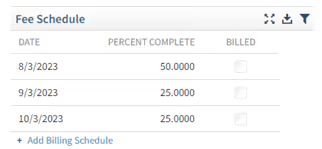
Create scheduled billings at predetermined milestones
- Fee billing by phase allows the total fee to be broken down into smaller pieces or separate line items which can be helpful in tracking specific tasks or phases of work. This option includes grouping (to consolidate specific phases together for invoicing purposes while separating for internal tracking) and the ability to post each phase or group to a specific WBS.
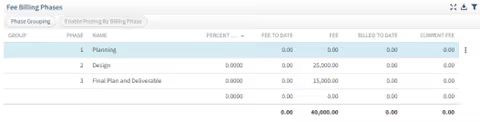
Breakdown total fee into smaller pieces or separate line items
Invoice Templates: Options for Invoice Display
Having the right invoice template showing the information your client needs impacts the speed of getting paid. There are options when it comes to setting up the invoice template and displaying specific information for the client. Some invoicing options can be selected or entered in billing terms; however, the invoice template editor can be used to get more specific on the invoice layout and information provided. Each tab on the invoice template editor allows you to select and control a variety of information (see image below). Becoming familiar with these options enables you to satisfy your client’s request for invoicing.
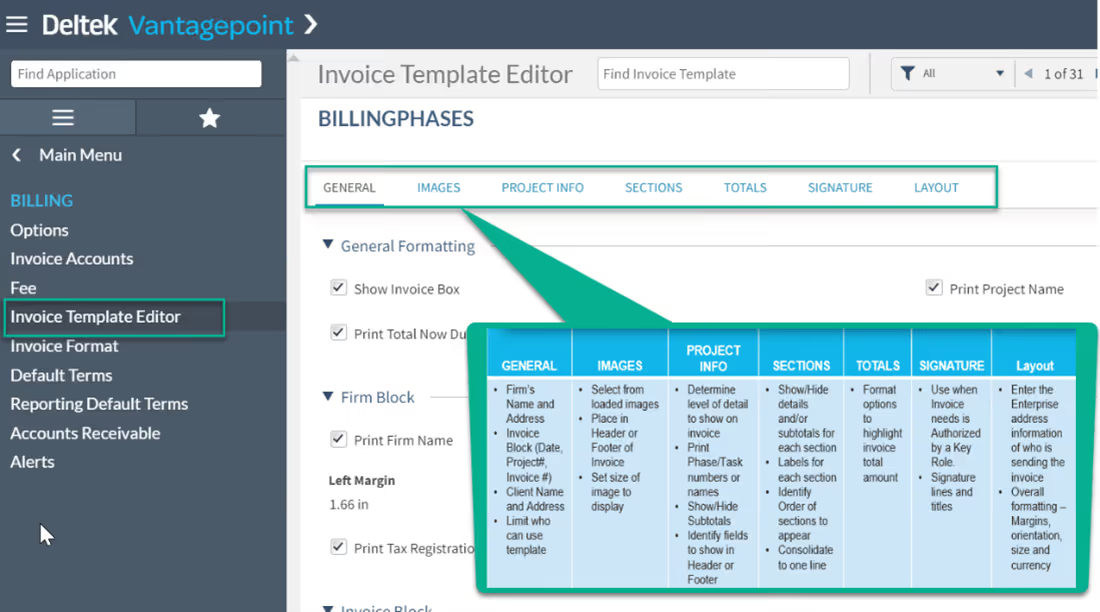
Create custom invoice templates in the invoice template editor application
Getting set up is the key to success in most processes. Taking the time up front when setting up your projects can save a great deal of time and energy once you are in the throes of the billing process. Stay tuned to Part 2 of this series where we will explore tools used during the billing process.
Expand Your Vantagepoint Knowledge
Attend educational sessions and network with other users at Deltek ProjectCon.